
Wonder Dynamics AI Review 2026: The Best AI VFX for Filmmakers.
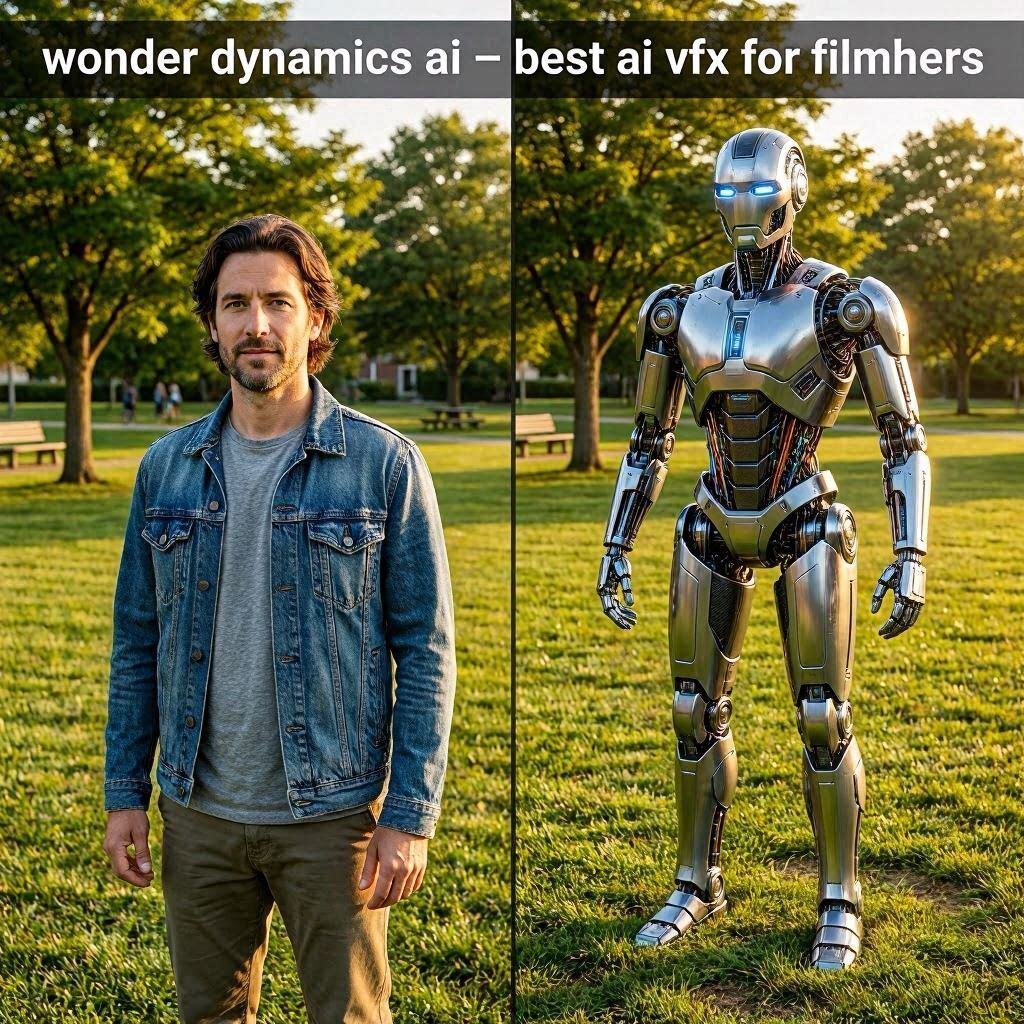
Wonder Dynamics AI Review 2026: The Best AI VFX for FilmmakersIntroductionImagine you are an indie filmmaker with a great script. The story calls for a giant robot, a fire-breathing dragon, or an alien creature. But you have no budget for expensive CGI. No team of VFX artists. No motion capture studio.Wonder Dynamics solves this problem.Wonder Dynamics is a Hollywood-grade AI VFX tool that lets you add fully-animated CGI characters to real videos without a green screen, without motion capture, and without a VFX team. Just film an actor, upload the video, choose a character, and AI replaces the actor with the CGI character – automatically matching lighting, shadows, and movement.In 2026, Wonder Dynamics has been used by major studios and indie filmmakers alike. It was co-founded by actor Tye Sheridan (Ready Player One) and has raised millions in funding. It is the most accessible professional VFX tool ever created.What is Wonder Dynamics?Wonder Dynamics is a cloud-based AI VFX platform that automates the process of adding CGI characters to live-action video.How it works:Film an actor performing any action (can be any location)Upload the video to Wonder DynamicsChoose a CGI character (robot, dinosaur, alien, etc.)AI analyzes the actor’s movement, lighting, and shadowsAI replaces the actor with the CGI characterDownload your Hollywood-quality VFX shotThe magic: No green screen needed. No motion capture suit needed. No manual keyframing needed. AI handles everything – tracking, lighting, shadows, and even animation.Unique features:No green screen required – Works on any backgroundAuto-lighting matching – CGI character matches scene lightingAuto-shadow generation – Realistic shadows on groundAuto-animation – Character moves exactly like the actorMultiple characters – Add up to 3 characters per shotReal-time preview – See results before renderingWonder Dynamics is perfect for indie filmmakers, music video directors, commercial producers, and anyone who wants professional VFX on a budget.Key Features of Wonder Dynamics1. Green Screen-Free Character Replacement (The Main Feature)This is Wonder Dynamics’ killer feature. No green screen needed:Traditional VFX Wonder DynamicsGreen screen studio Any locationProfessional lighting Natural lighting worksMotion capture suit Regular clothesVFX team Just youDays/weeks of work MinutesHow it works: AI analyzes the background, tracks the actor’s movement, and seamlessly composites the CGI character over the actor – including proper lighting, shadows, and occlusion (character going behind objects).2. Auto-Lighting MatchingCGI character automatically matches the scene’s lighting:Lighting Element How AI Handles ItDirection Light hits character from correct angleColor Character reflects scene colorsIntensity Brightness matches environmentShadows Casts realistic shadowsNo manual lighting setup. No HDRI maps. AI figures it out.3. Auto-Animation (No Keyframes)The CGI character moves exactly like your actor:Movement How AI CapturesWalking Tracked from actorRunning Tracked from actorJumping Tracked from actorFighting Tracked from actorDancing Tracked from actorHand gestures Tracked from actorYou don’t need to animate anything. The actor’s performance drives the CGI character.4. Multiple Character LibraryChoose from a growing library of CGI characters:Character Category ExamplesCreatures Dragon, Dinosaur, Wolf, SpiderRobots Mechs, Droids, HumanoidsAliens Sci-fi creatures, ExtraterrestrialsFantasy Troll, Orc, Goblin, GiantSci-Fi Cyborg, Android, HologramYou can also request custom characters (for Enterprise).5. Real-Time PreviewSee the CGI character in your scene in real-time:Drag and drop character into sceneAdjust position, scale, rotationAI updates lighting and shadows instantlyRender when ready6. Multi-Character SupportAdd up to 3 CGI characters in the same shot:Character A (robot) fights Character B (alien)All characters interact with each otherAI handles all tracking and lighting7. Camera Tracking (No Markers)AI tracks camera movement automatically:Camera Movement AI HandlesStatic shot ✅ YesPan ✅ YesTilt ✅ YesDolly ✅ YesHandheld ✅ YesDrone shot ✅ YesNo tracking markers needed on set.8. Export OptionsFormat Best ForMP4 Final videoEXR Professional color gradingPNG sequence Further editingAlpha channel CompositingHow to Use Wonder Dynamics (Step by Step)Step Action1 Go to wonderdynamics.com2 Sign up (free trial available)3 Click “New Project”4 Upload your live-action video (MP4, MOV)5 AI analyzes the shot (30-60 seconds)6 Choose a CGI character from library7 Place character over the actor8 Adjust scale and position9 AI processes lighting, shadows, animation10 Preview in real-time11 Click “Render”12 Download final VFX shot (MP4/EXR)Pricing: Free Trial vs PaidFeature Free Trial Pro Plan Studio Plan EnterpriseMonthly Cost $0 (one-time) $15/month $50/month CustomExports/month 5 shots 30 shots 150 shots UnlimitedMax Duration 10 seconds 30 seconds 60 seconds UnlimitedResolution 720p 1080p 4K CustomCharacters 10 All All + priority CustomMulti-Character ❌ No ❌ No ✅ Up to 3 ✅ Up to 5Custom Character ❌ No ❌ No ❌ No ✅ YesWatermark Yes No No NoCommercial Use No ✅ Yes ✅ Yes ✅ YesFree trial: 5 shots, 10 seconds each – test before buying.Pro (15/month):∗∗Forindiecreators.∗∗Studio(15/month):∗∗Forindiecreators.∗∗Studio(50/month): For professionals and small studios.Enterprise: For major productions and studios.Real-World ExamplesExample 1: Indie Sci-Fi Short FilmScenario: Filmmaker wants a giant robot in their short film.Wonder Dynamics Workflow:Film actor in an abandoned warehouseUpload 20-second clipChoose “Mech Robot” characterPlace robot over actorAI processes lighting, shadows, animationRender final shotResult: Hollywood-quality VFX shot for $15/month.Example 2: Music Video with Fantasy CreaturesScenario: Music video director wants a dragon flying around the singer.Wonder Dynamics Workflow:Film singer on location (forest)Upload 30-second clipChoose “Dragon” characterPlace dragon flying above singerAI processes movement, lightingAdd particle effects (smoke, fire)Render final videoResult: Epic fantasy music video on indie budget.Example 3: Commercial with Animated CharactersScenario: Brand wants a talking dinosaur for their ad.Wonder Dynamics Workflow:Film actor speaking to cameraUpload 15-second clipChoose “Dinosaur” characterAI matches lip movement to dialogueAdd background elementsRender final commercialResult: Engaging, memorable brand content.Pros and Cons✅ ProsNo green screen needed – Works anywhereNo motion capture suit – Regular clothes workAuto-lighting and shadows – AI does the hard workReal-time preview – See results instantlyHollywood quality – Used by major studiosAffordable ($15-50/month)Free trial availableExport to professional formats❌ ConsShort clip limits (10-60 seconds)No hand/finger detail (basic hands only)Limited character library (growing)No facial expression transfer (character has fixed face)Requires decent computer (GPU recommended)Processing time (5-10 minutes per shot)Who Should Use Wonder Dynamics?User Type Why Use Wonder Dynamics?Indie filmmakers Add VFX on a budgetMusic video directors Create epic visualsCommercial producers Stand-out adsYouTubers Cinematic contentStudents Learn VFXAgencies Client workAnyone Professional VFX made accessibleTips for Best ResultsUse good lighting – Even natural light worksAvoid fast camera movement – Slow pans are bestClear background – Avoid clutter behind actorFull body in frame – Don’t cut off limbsKeep clips short – 10-20 seconds idealShoot from one angle – Avoid complex camera movesUse free trial first – Test before subscribingFrequently Asked QuestionsIs Wonder Dynamics really free?Free trial gives you 5 shots (10 seconds each).Can I use my own 3D character?Yes, Enterprise plan allows custom character upload.Do I need a green screen?No. Wonder Dynamics works on any background.How long does processing take?5-10 minutes per shot, depending on length.Can I use Wonder Dynamics for YouTube?Yes, Pro and Studio plans allow commercial use.Is it as good as Hollywood VFX?For indie budgets, yes. For Marvel movies, no. But amazing for the price.Final VerdictWonder Dynamics is not trying to replace Industrial Light & Magic (ILM) or Weta Digital. Instead, it is democratizing VFX – making Hollywood-quality CGI accessible to indie creators.If you are an indie filmmaker with a sci-fi script, Wonder Dynamics will bring your creatures and robots to life.If you make music videos, Wonder Dynamics will elevate your visuals.If you create commercial content, Wonder Dynamics will help you stand out.The free trial gives you 5 shots to test. The 15/monthProplanisaffordable.The15/monthProplanisaffordable.The50/month Studio plan is for serious creators.For accessible, AI-powered VFX, Wonder Dynamics is the best tool available in 2026.Rating: 4.6/5 Best for: Indie filmmakers, music video directors, commercial creators Worst for: Complex facial animation, long-form content, full-feature films.